

1.Download Authenticator App


2.Locate 2FA Settings
- Open the Crypto.com app, and tap on Settings in the left top corner.


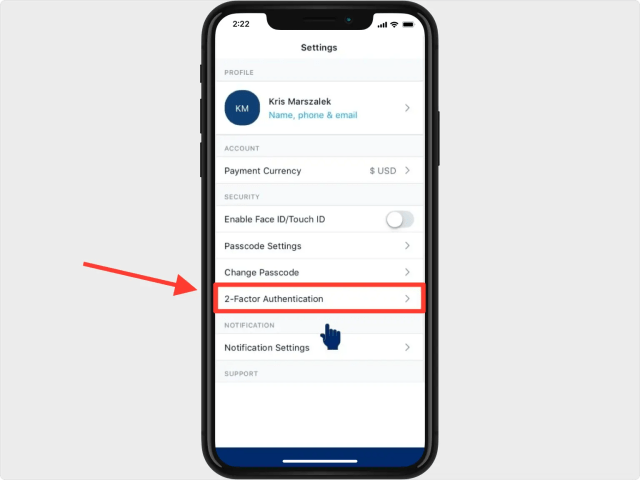
3.2-Factor Authentication Settings
- From the settings menu in the Crypto.com app, tap on 2-Factor Authentication.
4.Enable 2FA
- On the next screen toggle on the Enable 2FA.

5.QR Code
- A pop-up window will appear for you to scan the QR Code. Take a screenshot of the QR code screen and save it into Files on your device.
Note: Do not scan the demo image shown below.
6.Add Crypto in Authenticator
- Open Authenticator App and at the bottom of the screen, tap the plus sign and choose Files, next select the screenshot you made earlier.

7.Save Account
- After successfully importing the QR Code screenshot, Authenticator app will automatically choose the Crypto.com logo and autofill account name and secret key. If you want you can change the icon or the account name. Press on Save when ready.

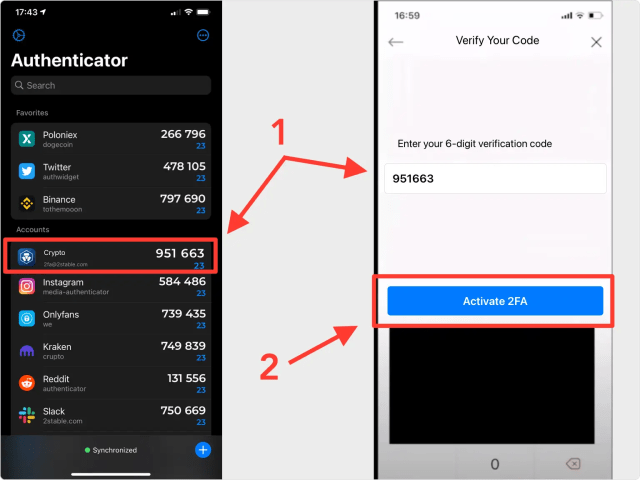
8.Verify Your Authentication Code
- Copy the numerical code provided from Authenticator App and confirm it on the Crypto.com app, then click Activate 2FA. Note that this code refreshes every 30 seconds.
9.Done!
- You have successfully set up two-factor authentication (2FA) for your Crypto.com account, from now on, you will need to use the Authenticator App when you log in.

You’re all set! You’ve enabled Two-Factor Authentication (2FA) for your Crypto.com account. To learn more, visit the Crypto.com support page. Stay safe!