

1.Download Authenticator App


2.Locate 2FA Settings
- When logged into your Google or Gmail account, click on your account icon at the top right of the screen. Then click Manage your Google Account.


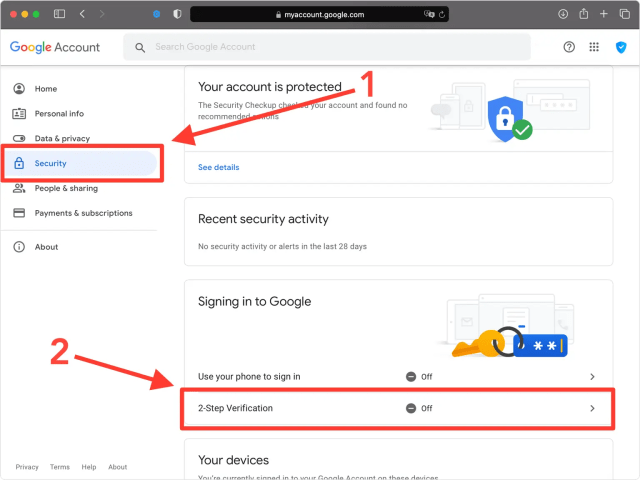
3.2-Step Verification
- Go to Security, next press on 2-Step Verification in the Security section.
4.Get Started
- Click on Get Started.

5.Confirm Password
- Next, you will need to renter your Google password and click on Next.

6.Confirm your phone number
- Enter your phone number and choose the method to get a verification code and click Next.

7.Verify your phone number
- Google will send you a 6 digit security code. Enter that code into the verification field and press on Next.

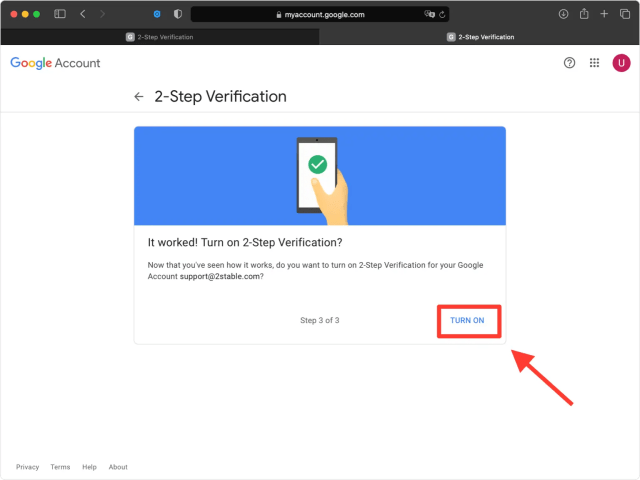
8.Turn On
- Click on Turn On.
9.Choose Authenticator App
- Now from available second steps options find Authenticator App, and click Set Up.

10.Select Device
- Choose the type of device you are authenticating with and click Next.

11.QR Code
- A pop-up window will appear for you to scan the QR Code with Authenticator App. Keep this window open as you reach for your phone. This is a good example of how other sites will prompt you to use Google Authenticator for two-factor authentication. While it makes sense that Google would want to promote their own app, remember that you can always substitute it with Authenticator App by Rho Apps instead.

12.Capture QR Code
- Open Authenticator App and at the bottom of the screen, tap the plus button


13.Two-Factor Authentication Code (2FA)
- After successfully scanning the QR Code, Authenticator App will automatically choose the Google logo and autofill account name and secret key. If you want you can change the icon or the account name. Press on Save when ready.

14.Verify Your Code
- Copy the numerical code provided from Authenticator App and confirm it on the Google website and then click Verify. Note that this code refreshes every 30 seconds.

15.Done!
- You have successfully turned on 2-step verification for your Google account, from now on, you will need to use the Authenticator App when you log in.

You’re all set! You’ve enabled Two-Factor Authentication (2FA) for your Google account. To learn more, visit the Google support page. Stay safe!